
Hamilton Electronic Locker Guide
The electronic locker is a multi – functional storage cabinet that incorporates intelligent unlocking technologies, including password locks, fingerprint locks, infrared barcode – scanning locks, coin – operated unlocking, and card – swiping unlocking. It offers a safe, convenient, and efficient temporary storage solution for public places. The cabinet is made of high – quality thickened cold – rolled steel, and comes in a variety of color options to meet the needs of different scenarios.
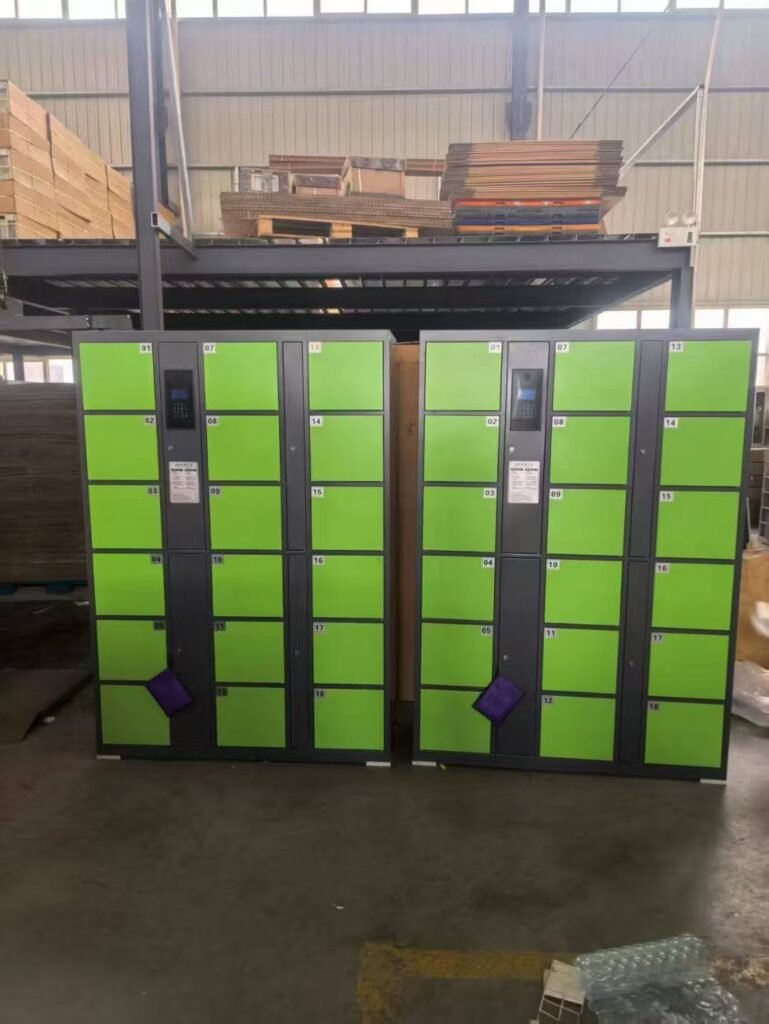
2. Product Specifications and Parameters
- Main Material: Thickened cold – rolled steel
- Surface Treatment: Phosphate pre – treatment (phosphating for anti – corrosion) + electrostatic spraying
- Standard Number of Doors: 4, 6, 8, 12, 24, 36, 48 (customizable number of doors is supported)
- Standard Dimensions (HWD):
- 1800850300mm
- 18002250460mm
- 18001430300mm
- (Height, width, depth, and the number of doors can all be customized according to requirements)
- Installation Method: Modular plug – in for quick installation
- Appearance Colors: A variety of standard colors are available, and color customization is supported to blend perfectly with the usage environment.
3. Core Details and Functional Design
3.1 Sturdy and Durable Cabinet
- Constructed from thickened cold – rolled steel, treated with phosphating for anti – corrosion and electrostatic spraying, ensuring a firm coating.
- The cabinet panels are built – in with heat – insulating materials to enhance thermal insulation performance and effectively protect the items inside.
- Features rust – resistance, fire – resistance, scratch – resistance, and easy – cleaning, making it long – lasting.
3.2 All – round Safety Protection
- Electronic Lock: Electromagnetically driven, automatically locks when power is cut off, ensuring safety and reliability.
- ABS Anti – collision Corner Guards: The optimally designed corner guards not only strengthen the structure but also enhance aesthetics, effectively protecting users from injury and preventing damage to the cabinet corners.
3.3 Intelligent Interactive Control System
- LCD Display: High – definition display shows operation guidelines, cabinet number status, time, and system information, providing clear and intuitive visuals.
- Acrylix Crystal Keyboard: It has an elegant and crystal – clear appearance, with a crisp and sensitive touch. It is waterproof, has a long service life, and elevates the overall product grade.
- Voice Prompt: Provides voice guidance to help users complete operations easily, friendly to users of all ages.
3.4 Diverse Unlocking Methods (Optional)
- Password Unlocking: Randomly generated or self – set passwords that automatically expire after one use.
- Fingerprint Recognition: Biometric identification for safety, convenience, and no need for memorization.
- Infrared Barcode Scanning: Open the cabinet by scanning printed barcodes or barcodes on mobile phone screens, suitable for scenarios like supermarkets and venues.
- Coin – operated Charging: Equipped with a coin – inserted device, suitable for places that require paid management.
- Card – swiping Recognition: Supports IC/ID cards, suitable for membership – based places such as gyms and swimming pools.
3.5 Human – friendly Extended Features
- Customized Mobile Phone Charging: Optional built – in various types of sockets (five – hole sockets, multi – functional five – hole sockets, five – hole socket racks with single USB port, five – hole socket racks with double USB ports, etc.) to meet users’ emergency charging needs and expand service scope.
- Durable Wires: Metal – mesh – braided power cords are used, which are wear – resistant and tensile – resistant, improving safety and service life.
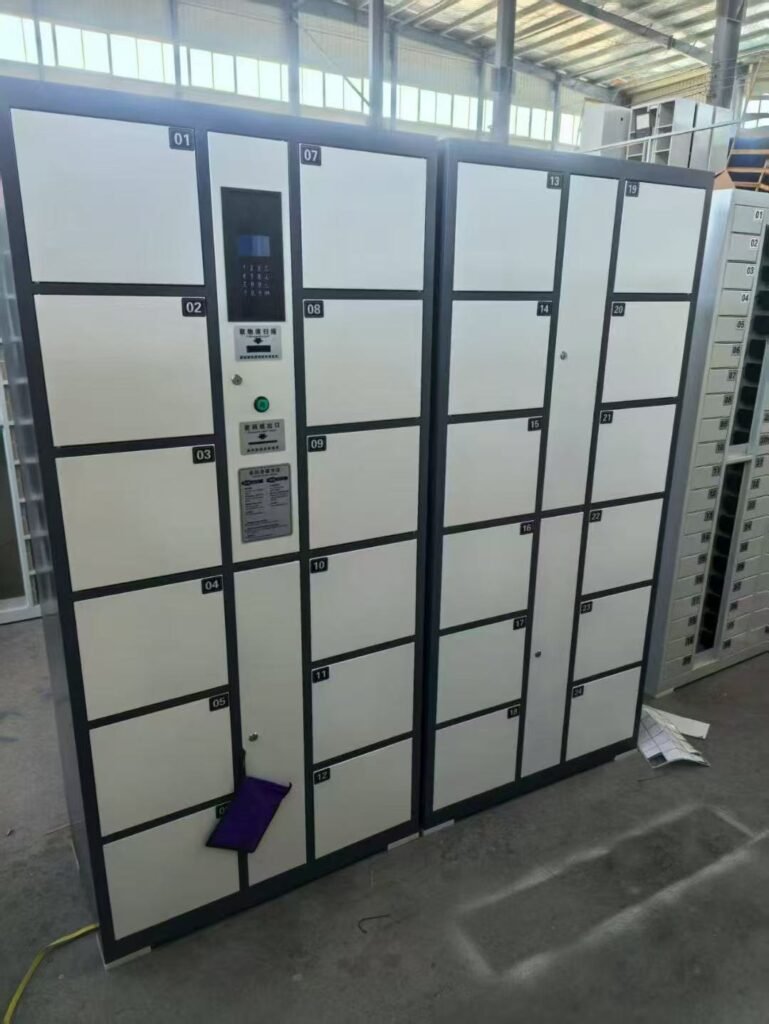
4. Product Installation, Usage, and Maintenance Guide
4.1 Installation Guide
4.1.1 Site Preparation
- Select a solid and flat indoor floor, ensuring that the ground load – bearing capacity meets the full – load usage requirements.
- Ensure that there is a grounded power socket of the appropriate specification near the installation location.
- Reserve sufficient operating and heat – dissipation space (it is recommended to reserve at least 10 cm of space behind and on the sides of the cabinet).
4.1.2 Quick Installation Process
- Modular Docking: This product features a plug – in design. Arrange and align each cabinet module in the preset order, and use the special connectors at the bottom and sides for quick plug – in and mechanical fixation. No complex tools are required.
- Power Connection: Reliably connect the standard – equipped metal – mesh – protected power cord to the electrical socket, ensuring good grounding.
- Power – on Debugging: After powering on, the system initializes automatically. Set the system time, management password, unlocking mode, and charging rules (if enabled) through the management interface.
- Function Testing: Test one by one whether the opening and closing of each cabinet door, the action of the electronic lock, the display screen, the keyboard, and the voice prompt are normal.
4.2 Usage Guide
4.2.1 User Storage Process
- Press the “Store” button on the control panel.
- According to the screen and voice prompts, perform the specified operations (such as scanning, fingerprint entry, coin – insertion, card – swiping, etc.).
- The system automatically allocates/designates an empty cabinet, and the cabinet door opens automatically.
- After placing the items, make sure to close the cabinet door tightly, and the system will lock automatically.
4.2.2 User Retrieval Process
- Use the corresponding voucher (such as barcode paper, password, fingerprint, IC card, etc.) used during storage for verification.
- After successful verification, the corresponding cabinet door will open automatically.
- After retrieving the items, close the cabinet door for the next use.
4.2.3 Management Functions
Administrators can enter the background through the management password to perform operations such as clearing cabinets, setting parameters, and querying usage records.
4.3 Maintenance and Care Guide
4.3.1 Daily Cleaning
- Wipe the cabinet surface (including ABS anti – collision corner guards) with a soft dry or damp cloth.
- For stubborn stains, wipe with a cloth dipped in a small amount of neutral detergent, and then wipe dry with a dry cloth. Do not use corrosive chemicals or abrasives.
4.3.2 Regular Inspections
- Monthly: Check whether all cabinet doors open and close smoothly. Add an appropriate amount of lubricating oil to the hinges and lock tongues. Check whether the keyboard, display screen, and barcode – scanning window are clean and functioning properly.
- Quarterly: Check whether the power cord and connectors are intact, and whether the cabinet is firmly fixed.
- Annually: It is recommended to have a comprehensive electrical safety inspection and system maintenance by professionals.
4.3.3 Precautions
- In case of system failures (such as inability to open the cabinet), please contact the administrator first. Do not force open the cabinet.
- Disconnect the main power supply when not in use for a long time.
- Do not place heavy objects or liquids on the cabinet top, and avoid direct flushing of the cabinet with water.

5. Applicable Places and Recommended Configurations
This product, with its features of sturdiness, safety, intelligence, convenience, and flexible customization, can be widely applied in the following places. Based on the core needs of different scenarios, we recommend the most suitable lock and function combinations.
5.1 Commercial Retail Sector
- Large Supermarkets, Shopping Malls, Department Stores: Infrared barcode – scanning locks are recommended. They are low – cost, and the operation is simple and intuitive for users (scan to store, scan to retrieve), eliminating the need for memorization, making them most suitable for mobile customers.
- Home Improvement Markets, Brand Specialty Stores: Password locks are recommended. Customers may stay for a long time or enter and exit multiple times. Random passwords are convenient and have no consumable costs.
5.2 Cultural and Entertainment Venues
- Swimming Pools, Gyms, Stadiums, Yoga Studios, Ski Resorts: Card – swiping (IC/ID card) locks are recommended. They can be integrated with the membership card system, enabling exclusive use for members, with convenient management and a smooth experience.
- Libraries, Museums, Archives: Password locks or barcode – scanning locks are recommended. They meet the temporary storage needs of visitors and are easy to manage.
- Cinemas, Theaters, Amusement Parks, Arcades, KTVs: Coin – operated locks or barcode – scanning locks are recommended. Coin – operated locks can directly generate revenue, while barcode – scanning locks are suitable for free storage management in large venues.
5.3 Public Service Institutions
- Government Service Centers, Human Resources Markets, Hospitals/Medical Examination Centers: Password locks are recommended. The process is simple, suitable for visitors with uncertain service times, and offers high security.
- Banks, Post Offices: Password locks are recommended. The security level requirement is high, and password locks eliminate the risk of losing physical vouchers.
- Bus Stations, Train Stations, Airports: Password locks or fingerprint locks are recommended. The security requirement is extremely high, and passwords or biometric identification can effectively prevent the loss or theft of vouchers. Fingerprint locks are especially suitable for scenarios that require quick verification.
5.4 Education and Research Institutions
- Libraries and Gyms in Colleges, Universities, Secondary and Primary Schools: Card – swiping locks (integrated with campus cards) or password locks are recommended.
- Laboratories, Computer Rooms, Examination Halls: Password locks or barcode – scanning locks are recommended. They are used to store prohibited items such as mobile phones and school bags, with convenient management and traceability.
5.5 Factories and Enterprises
- Employee Changing Rooms/Valuables Cabinets: Fingerprint locks or card – swiping locks (integrated with employee cards) are recommended. They are for exclusive use, offer strong privacy, and eliminate the trouble of carrying keys or memorizing passwords.
- Visitor Reception Desks: Password locks are recommended. The front desk can assign one – time passwords to visitors, ensuring safety and control.
5.6 Other Special Venues
- Tourist Attractions, Parks, Beach Baths: Coin – operated locks or scan – to – pay locks are recommended. They can be used as paid service items to directly generate revenue.
- Wedding Banquet Halls, Convention Centers: Password locks are recommended. They can provide temporary storage services for guests, with passwords set or assigned uniformly by the organizer.
- Churches, Temples: Simple password locks or coin – operated locks are recommended. They meet the basic storage needs of believers or tourists.
5.7 Summary: Configuration Selection Logic
- Pursuing Low – cost and Ease of Use: Infrared barcode – scanning locks are the first choice.
- Membership – based and High – frequency Use: Card – swiping locks are the first choice.
- High – security and No – voucher Requirements: Password locks or fingerprint locks are the first choice.
- Generating Revenue: Coin – operated locks are the first choice.